Turn Your CS2 Demos Into Training Tools Using Free Editing Software
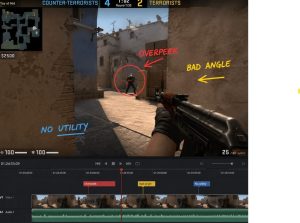
If you’re serious about improving in CS2 and climbing platforms like FACEIT, watching your demos is one of the fastest ways to get better and steadily increase elo. The problem is that most players just watch their demos passively and move on. They might notice a missed shot or a bad round, but they rarely turn those observations into actual improvement.
The difference between players who stay stuck and those who climb is simple. Better players treat demos as training, not just replays. With the help of free software, you can turn your gameplay into something structured, repeatable, and useful.

Why Watching Demos Alone Doesn’t Work

Watching a full match without a system often leads nowhere. It feels productive, but the learning doesn’t stick. You might recognize a mistake in the moment, but by your next game, you’ve already forgotten it.
Editing forces you to slow things down and focus. Instead of scanning through rounds, you isolate key situations and revisit them with intention. That shift alone turns demo review into a real skill-building habit.
Common issues when players only watch demos:
  • They don’t take notes or track patterns.
  • They focus only on aiming mistakes.
  • They don’t revisit the same scenarios again.
Editing solves all of these by making your review more deliberate.

Step 1: Get Your Demo and Identify Key Moments

Start by downloading your demo from your CS2 match history or FACEIT. Open it in-game and begin reviewing, but don’t try to analyze everything. Focus only on serious situations.
Look for moments where decisions mattered:
  • Your deaths, especially repeated ones
  • Clutch attempts
  • Entry fights
  • Rotations and positioning
These are the clips that will give you the most value. Instead of reviewing an entire 30-minute match, you’ll be working with short, focused segments.

Step 2: Record and Extract Clips

Once you’ve identified key moments, record them using a free tool like OBS Studio. Keep each clip short, usually between 5 and 20 seconds. The goal is to isolate the exact moment where something went right or wrong.
While recording, start asking simple but important questions. Why did you lose that duel? Were you in the correct position? Did you have information before making that move?
By focusing on specific clips, you avoid wasting time and make your review more actionable.

Step 3: Choose the Right Free Editing Software

You don’t need paid tools to do this effectively. Several free options can handle everything you need.
  • DaVinci Resolve for more advanced editing and control
  • CapCut desktop if you want something simple and quick
  • Shotcut if you prefer a lightweight option
The tool itself is not the focus. What matters is how you use it to break down your gameplay.

Step 4: Turn Clips Into Training Scenarios

This is where real improvement begins. Instead of just watching clips, you transform them into lessons you can revisit.
Start by slowing down your footage. Reducing the speed helps you catch small details, such as crosshair placement, movement timing, and enemy reactions. Many mistakes happen in a fraction of a second, and slowing things down makes them obvious.
Next, add simple annotations. You don’t need anything fancy. A few words on screen can reinforce what you’re seeing and help you remember it later.
Examples of useful notes:
  • Bad angle
  • No utility used
  • Overpeek
  • Good positioning
You can also pause your clip right before a key moment. This is especially helpful before duels or decisions. Ask yourself what the best play would be, then continue the clip and compare it with what you actually did. Over time, this builds your decision-making and awareness.
Another effective method is grouping similar mistakes. Instead of focusing on a single bad play, combine several clips that illustrate the same issue. This helps you recognize patterns instead of isolated errors.

Step 5: Build a Personal Training Library

As you collect clips, organize them into categories. This turns your demo review into a long-term resource you can revisit anytime.
You can group clips based on:
  • Aim and mechanics
  • Positioning errors
  • Decision-making mistakes
  • Good plays are worth repeating.
Having everything organized makes your practice more focused. Instead of guessing what to improve, you already have clear examples of your weaknesses and strengths.

Step 6: Apply What You Learn In-Game

Reviewing and editing only matter if you apply them. After each session, choose one or two things to focus on in your next matches. Trying to fix everything at once usually leads to frustration.
For example, you might decide to improve your crosshair placement or avoid overpeeking without information. Keeping your focus narrow helps you build consistency faster.
Improvement in CS2 is not about playing more games. It is about playing with intention and correcting mistakes as they happen.

Common Mistakes to Avoid

Even with editing, some habits can slow your progress. Many players only review losses, but wins can contain just as many mistakes. Others focus only on the aim, even though positioning and decision-making have a bigger impact on rank.
Another common issue is not revisiting clips. Watching something once is rarely enough. Repetition is what builds awareness and muscle memory.
Also, don’t overcomplicate your edits. You don’t need transitions or effects. Clear and simple clips are more effective for learning.

Why This Works for FACEIT and Elo Climbing

FACEIT games are more competitive, and small mistakes are punished quickly. By reviewing and editing your demos, you start fixing habits that show up in every match.
You become more consistent, more aware of your positioning, and faster in your decisions. These are the qualities that help players climb, not just raw aim.
This process is similar to what professional players and coaches do, but you’re building it yourself using free tools.

Final Thoughts

If you feel stuck in your current rank, the issue is often not your mechanics but your habits. Demo editing helps you uncover those habits and fix them in a structured way.
Instead of grinding matches without direction, you turn your own gameplay into a training system. Over time, this leads to better decisions, fewer repeated mistakes, and steady improvement.
In the end, the players who climb are not just the ones who play more. They are the ones who understand their game and learn from it consistently.
How a SAP Partner Company Can Streamline Your Editing Software Workflows

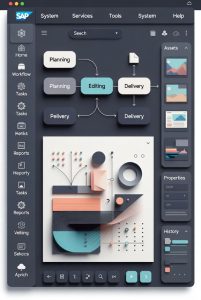
SAP-style enterprise interfaceLarge editing teams lose hours every week to version confusion, missed handoffs, and unclear project ownership. As content volumes rise across video, audio, and digital media, studios need systems that manage more than files. They need structure, visibility, and speed across every stage of production.

This is where a SAP partner company adds real value to editing software environments. By connecting creative tools with SAP ERP and cloud platforms, companies like Accely help teams manage projects, resources, and collaboration from one shared system. Editors spend less time chasing updates and more time producing finished work.

Why Editing Workflows Break Under Scale

Most editing software is designed for creativity, not operations. If you want to explore different tools and approaches to optimizing your editing setup, see software for editing and transforming your digital footprint. Timelines, asset libraries, and effects tools work well for individuals or small teams. Problems appear when dozens of editors, producers, and clients work in parallel.

Common issues include unclear task ownership, delayed approvals, and poor visibility into project status. Resource planning often lives in spreadsheets, while budgets sit in separate systems. This fragmentation slows delivery and increases the risk of errors.

SAP ERP platforms address these gaps by acting as a central source of truth. When connected properly, they bring order to creative chaos without limiting artistic freedom.

How SAP ERP Supports Editing Software Pipelines

SAP ERP systems are built to manage complex workflows at scale. When integrated with editing tools, they help studios track projects from intake to final delivery.

  • Project timelines stay aligned with real workloads and deadlines.
  • Assets are linked to specific tasks, clients, and approvals.
  • Budgets update in real time as work progresses.
  • Managers gain visibility into bottlenecks before delays occur.

This structure allows editing teams to plan better and respond faster. Instead of reacting to problems, they prevent them.

Real-Time Collaboration Without the Noise

Collaboration is essential in modern editing environments, but too many tools can slow teams down. Messages, comments, and file versions spread across platforms create confusion.

With SAP cloud solutions, collaboration becomes part of the workflow. Editors, producers, and reviewers work from shared dashboards that reflect the latest status. Feedback ties directly to tasks, assets, and deadlines.

This approach reduces email traffic and removes guesswork. Everyone sees what needs attention and who owns the next step.

Resource Planning That Matches Creative Reality

Editing work is unpredictable. A simple cut can turn into a full rework, and urgent client requests can derail schedules. Traditional planning tools struggle with this reality.

SAP resource management tools adapt better to creative workflows. They show who is available, what skills are needed, and how changes affect delivery dates. When priorities shift, managers can rebalance workloads quickly.

Studios that work with an experienced SAP partner company benefit from configurations tailored to media production, rather than generic enterprise setups.

Smoother Implementations With Certified Expertise

ERP projects fail when they ignore how people actually work. Editing teams resist systems that feel rigid or disconnected from their tools.

Certified SAP providers like Accely focus on alignment. They map real workflows, integrate existing editing software, and train teams gradually. This reduces disruption and improves adoption.

The result is a system that supports creativity instead of slowing it down.

Building Faster, Clearer, and Scalable Editing Operations

Editing teams face growing pressure to deliver more content in less time. Technology alone does not solve this problem. The right integration strategy does.

By working with a trusted SAP partner company, studios can connect creative tools with enterprise-grade systems that improve clarity, collaboration, and control. The payoff shows in shorter turnaround times, fewer errors, and calmer production cycles.

Efficiency becomes part of the workflow, not an afterthought.

Why Content Creators Are Using Reddit Engagement Services to Push Their Editing Tutorials

Content creators are constantly seeking ways to reach larger audiences for their editing tutorials, whether they focus on video editing, photo manipulation, or graphic design. Platforms like YouTube, Instagram, and TikTok provide exposure, but Reddit has emerged as a key tool for sharing expertise directly with engaged communities.

Reddit offers specialized communities called subreddits where users are genuinely interested in learning new skills. Many content creators are turning to promotion strategies that include paid Reddit engagement services to get their tutorials noticed. Using these accounts are the great way to avoid multiple bans, creators can post across several subreddits without worrying about being restricted or flagged, ensuring their content reaches multiple audience segments effectively.

How Reddit Helps Tutorials Gain Visibility

content creator browsing Reddit

Reddit communities thrive on interaction. Unlike other social media platforms, Reddit allows long-form discussions and detailed explanations. This format is ideal for editing tutorials, which often require step-by-step instructions, video demonstrations, or downloadable templates.

Creators who understand Reddit’s voting system can leverage it to make their tutorials appear more frequently. Posts that receive upvotes move higher on subreddit feeds, attracting more views and engagement. Services that help with account management and post promotion make it easier to maintain visibility without violating platform rules.

Targeting the Right Subreddits

Success on Reddit depends heavily on choosing the correct subreddits. For editing tutorials, communities like r/VideoEditing, r/Photoshop, and r/AfterEffects are highly relevant. Creators can reach users who are already passionate about learning and sharing editing techniques.

  • Tailor content for the audience: Posts should address specific challenges or tools used by the subreddit members.
  • Engage with comments: Active interaction boosts credibility and encourages more upvotes.
  • Provide free resources: Offering free templates, project files, or short guides increases post value.

The Role of Engagement Services

Reddit engagement services simplify the process of sharing tutorials. They can manage multiple accounts, schedule posts for optimal times, and ensure that content is consistently visible without breaching Reddit’s policies. This saves creators time while maximizing reach.

Creators benefit from these services because they can focus on producing high-quality tutorials rather than worrying about technical restrictions or the limitations of individual accounts. The ability to post safely across multiple subreddits allows tutorials to gain traction more quickly, especially for new creators trying to build credibility.

Boosting Video and Photo Tutorials

For video editors, Reddit allows the sharing of quick tips, full-length tutorials, or behind-the-scenes content. Photo editors can post before-and-after shots, breakdowns of editing techniques, or downloadable templates. Using engagement services ensures these posts are seen by users who are most likely to engage, comment, and share. Many creators also rely on specialized software for editing and transforming your digital footprint to create high-quality tutorials and templates efficiently.

Regular posting combined with strategic engagement also helps creators establish authority in their niche. Over time, their tutorials become trusted resources, and followers from Reddit often migrate to YouTube channels, personal blogs, or paid platforms.

Measuring Success

Creators should track the impact of Reddit promotion through metrics like upvotes, comments, and traffic to linked sites or tutorials. Engagement services often provide analytics to monitor which posts perform best, helping creators refine their strategies. Consistent tracking enables them to understand audience preferences and tailor tutorials accordingly.

Conclusion

Reddit has transformed into a powerful platform for content creators looking to expand the reach of their editing tutorials. By leveraging Reddit engagement services, using multiple accounts safely, and targeting the right communities, creators can achieve higher visibility and grow their audience more effectively. With careful planning and the right tools, tutorials on video editing, photo manipulation, and graphic design can reach thousands of engaged learners, turning casual viewers into loyal followers.

Using strategies like accounts are the great way to avoid multiple bans ensures creators stay compliant while expanding their reach, making Reddit an essential tool in modern content promotion.


Software for Editing and Transforming Your Digital Footprint

Your digital footprint is everything that represents you online, from your social media posts and comments to the websites you visit and the content you create. In a world where most people form opinions based on what they find online, managing and transforming your digital presence by Reputn, has become just as important as keeping your professional resume updated. The good news is, there are now powerful software tools designed to help you edit, enhance, and protect your digital footprint.

Your Digital Footprint

Before choosing the right tools, it’s important to understand what a digital footprint actually is. It includes both active data which are things you post intentionally, such as photos, videos, and articles and passive data, which are collected automatically, like browsing history or online shopping patterns. Over time, these small pieces of information create a profile of who you are online.

The challenge is that your digital footprint can influence your career, reputation, and even your financial credibility. For instance, hiring managers often check social media and public profiles before interviews. Likewise, brands use online data to determine customer trust. By using the right software, you can control how you appear online and ensure that your digital presence aligns with your goals.

Top Software for Editing and Managing Your Online Presence

Modern tools are designed to simplify how you manage your digital identity. Here are some categories and examples of software that can help:

1. Content Cleanup and Privacy Tools

These programs allow you to review and remove old or unwanted content that may affect your image.

Incogni and DeleteMe: These services identify personal information stored on public databases and request its removal.

Jumbo Privacy: A mobile app that scans your social accounts and gives recommendations to improve privacy settings.

Scrubber.ai: Helps you scan social media posts for sensitive or inappropriate content and lets you delete them in bulk.

These tools save time by automating what used to be a long, manual process—tracking down old posts or outdated mentions of your name.

2. Social Media Management Platforms

If you use social media for professional or personal branding, these tools can help you post strategically and analyze your online activity.

Hootsuite and Buffer: Ideal for scheduling posts, tracking engagement, and maintaining consistency across platforms.

Brand24 and Mention: Monitor where your name or business appears online so you can respond to mentions and manage reputation effectively.

These tools are not only for businesses. Anyone looking to maintain a clean, professional online image can benefit from tracking how they are perceived digitally.

3. Online Reputation and SEO Tools

For professionals or entrepreneurs, appearing positively in search results is vital.

Reputation.com and BrandYourself: Offer services to boost your personal or business profile by improving search visibility and suppressing negative content.

SEMrush and Ahrefs: While originally designed for businesses, these can help individuals understand what information about them appears most often in search engines.

These tools help shape how your name or brand appears when someone searches for you online, allowing you to highlight achievements and remove outdated information.

4. Creative Editing Software

Aside from privacy and SEO tools, creative software also plays a major role in refining your digital footprint.

Canva, Adobe Express, and CapCut help you produce high-quality visuals and videos that present a polished image on websites and social platforms.

Grammarly and Hemingway Editor refine written content, ensuring your blogs, captions, or online profiles appear professional and well-written.

Consistent, well-edited content not only improves your reputation but also builds trust with your audience.

Transforming Your Digital Footprint Step by Step

Simply having the right software isn’t enough; it’s about using them strategically. Here’s how to begin transforming your digital footprint in a practical way:

  • Audit Your Online Presence:
    Search your name on Google, social platforms, and forums. Identify what content represents you well and what doesn’t.
  • Remove or Update Outdated Content:
    Use tools like DeleteMe or Incogni to remove personal data you no longer want online. Review your social media posts and delete those that no longer reflect your values.
  • Optimize Your Profiles:
    Ensure your bio, photo, and descriptions across all platforms are consistent and up to date. Use Grammarly or Hemingway Editor to refine your content.
  • Create Positive, High-Quality Content:
    Publish articles, videos, or graphics that show your expertise or interests. Use design tools like Canva and editing apps like CapCut to create engaging visuals.
  • Monitor and Maintain:
    Use reputation and social listening tools such as Brand24 or Mention to stay informed about new mentions of your name. Regular monitoring prevents surprises and helps you manage your image proactively.

Why Transforming Your Digital Footprint Matters

A well-managed digital presence can open new opportunities. Employers, collaborators, and clients often look online first to learn more about you. If your profiles, content, and search results reflect reliability, creativity, and professionalism, you stand out immediately.

Transforming your digital footprint is about improving what exists and presenting the best version of yourself. Whether you are a student building your career or a business owner aiming for visibility, your online identity tells your story long before you meet anyone in person.

By taking advantage of modern software, you gain control over that narrative. You decide what people see, how they perceive your work, and how much personal information is accessible to the public. This balance between visibility and privacy defines digital confidence in today’s connected world.

The Type Of Software

Types of Software:
System Software – Manages the hardware and provides a platform for other software.

Application Software – Designed for end-users to perform specific tasks.

Programming Software – Provides tools for developers to write and test programs.

Middleware – Acts as a bridge between different software applications or systems.

https://www.evanolds.com